After having claimed my blog in Technorati (see previous post) I thought I’d try to do the same in Bloglines. They have a completely different way of verifying ownership.
They require you to add a hidden tag to your blog template and in one of your blog posts. They tell you what to add but they don’t explain how to do it. A search on Google reveals that a lot of people with self-hosted WordPress blogs seem to be finding it very hard to claim their blogs.
Due to the lack of instructions I made a guess at what to do and managed to get my blog claimed first time. Maybe I’m just lucky! :) This is what I did. Note that these instruction are for self-hosted WordPress blogs and may not apply for other blog platforms or for blogs hosted on the WordPress site.
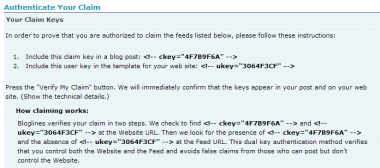
In the Publisher Tools section of my account on Bloglines I went through the basic steps of adding my blog URL until I got to the page giving the claim tags. As you can see the page gives no clues as to how you are supposed to apply the tags to your blog.
I use the Default theme on my site so I edited the header.php which lives here:
wp-content/themes/default/header.php
If you use a different theme you should modify the equivalent page in your theme.
I added the tag in the <head></head> section of the site as this tag isn’t designed to be viewed. You could probably add it anywhere in the <head></head> but here is where I added my tag.
<link rel="alternate" type="application/rss+xml"
 title="<?php bloginfo('name'); ?> RSS Feed"
 href="<?php bloginfo('rss2_url'); ?>" />
<link rel="pingback"
 href="<?php bloginfo('pingback_url'); ?>" />

<!-- ukey="3064F3CF" -->

<style type="text/css" media="screen">
Then I went into the Manage section of my WordPress control panel and edited the latest post using the non-WYSIWYG plain text editor. I inserted the blog tag at the very top of this post. This tag is non-viewable so you don’t need to worry about anyone seeing it.
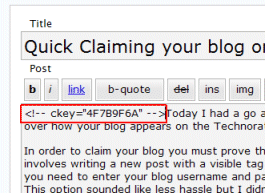
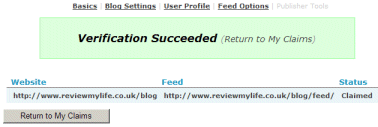
After doing this I went back to Bloglines and pressed the button to verify my claim. And it worked!
Then, you are lucky. I still can not authenticate my blog in my bloglines whereas I did as you did. I don’t know why is too difficult to claim our own blog in bloglines. They said that two steps verification needed to avoids false claims from those who can post but don’t control the Website.
See! I think only adding meta tag to the header is enough, especially for self-hosted blogging.
No luck here and as old as this post is I’m assuming they’re not planning on making it any easier. I’ve tried for an hour just now but I have other more pressing things to do so I may just have to pass on this site.
The issue is the [cencored ed: no swearing!] TinyMCE visual editor. I disabled it and was able to verify within a minute. I’ve contacted Bloglines to tell them they should warn of that, who knows how many users they’ve missed out on
It’s technically not their fault but that is the type of thing you hire people to plan and prevent these issues. Especially over the course of years they’ve had.