We’re well into 2009 so to follow on from my 2009 Excel one page calendar it seems time to put up the yearly calendar for 2010.
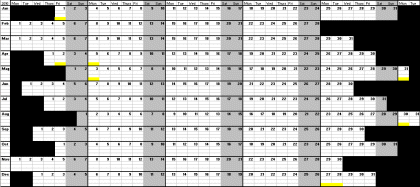
As before I’ve done a blank calendar with just the days / months marked out, and a calendar with the 2010 UK bank holidays highlighted.
2010 Excel calendar – blank (7kb)
2010 Excel calendar – with UK Bank Holidays highlighted (7kb)
Like before you should be able to get it to fit on your computer screen without any scrolling – you may need to adjust the box sizes, or zoom level depending on the resolution of your monitor.
For anyone who is planning well ahead I have now added my 2011 one page excel calendar to this site.


Thanks a bunch!!
Thanks these calendars have reallyhelped me out
Wow, exactly what I was looking for. Trying to work out kids annual leave with my own the usual way was killing me! Thanks soooo much.
Superb – will you be doing one for 2011?
Thank you
I am using the 2009 calendar and cannot believe I am looking at the 2010 version already. Where did this year disappear to? Anyone have an answer :) Excellent format, easy to use and adapt. Thanks for taking the time out to create it sharing.
Hi perfect calendar to helpwith a scheduling task for our rooms and trainers.
I found the 2009 version early in ’09 – it stood out amongst many others I found on the internet as suitable for my needs and easy to make modifications – I have various colour coded days on mine. As a busy dad with complicated commitments and travel needs, it helps me set out family arrangements with great ease and transparency. Like everyone, my plans are subject to change and I keep the latest version posted up on my fridge at home for easy viewing. I’ve just downloaded the 2010 version – thanks very much!
Hi Tony,
I’ve just added the 2011 calendar. You can find it at https://www.reviewmylife.co.uk/blog/2009/11/19/2011-one-page-excel-calendar/
this is good
Hi!
Thanks a bunch! Tremendously useful calendar!
At least in the version without Bank Holidays though, the chart still says “2009” at the bottom.
Hi Katha,
Thanks for spotting that. I’ve now fixed it.
Thanks so much!