I’ve been further improving the code that I described in my previous in my previous post – ‘Adding KML Google Maps overlays to WordPress posts‘.
I’ve made these changes:
- Option to specify a latitude / longitude / zoom for the map. This allows you to have one map and then show lots of different views of it
- The code is now implemented as a function rather than as included PHP. This means that the full map can be included in one line of PHP and the code only has to be included once in each page.
As before you can include a whole map which will be automatically centred and zoomed for you. The require_once is only needed once on each page, but no harm will come to you if it is included more than once. Only one argument is needed – the full URL to the KML file. A width / height can be included if you want.
<?php
require_once('../data/071223/mapiframe.php');
iframe("https://www.reviewmylife.co.uk/data/071223/track.kml");
?>
In the require_once you can either include an absolute path or a relative path.
The new options allow you to specify the latitude, longitude and zoom values. When you specify these values you also have to specify the width / height of the map. The argument list is:
- Full URL of KML – note this is the full URL not a relative one
- Width of map – in pixels
- Height of map – in pixels
- Latitude
- Longitude
- Zoom
<?php
require_once('../data/071223/mapiframe.php');
iframe("https://www.reviewmylife.co.uk/data/071223/track.kml",
	450, 400, "51.515339", "-0.054374", 15);
?>
To get the latitude / longitude / zoom values view your KML file in Google Maps. Click on ‘Link to this page’ as described in the previous post. Alter the zoom and position of the map so it shows that you want. Then copy the latitude / longitude / zoom values from the HTML box. The latitude / longitude are the values in the ‘ll’ parameter (latitude is first). The zoom is the ‘z’ parameter.
So if we are looking at the following page in Google Maps.
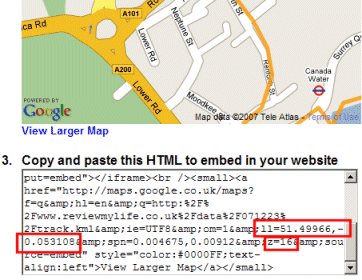
The latitude is 51.49966, the longitude is -0.053108 and the zoom is 16.
Here are the three files you’ll need.
You can see a demonstration of these scripts at www.londonphotoproject.co.uk/blog/. Here I have one KML file for my whole walking route, but I include multiple zoomed-in views of the map so I can describe the route in small sections.
For these scripts to work they’ll need to be interpreted as PHP4 rather than PHP5. If your web host is interpreting PHP files as PHP5 by default (which more and more of them are) simply put these PHP files in a separate directory and add a .htaccess with the following contents to that same directory.
# Treat files in this directory as PHP4
AddType x-mapp-php4 .php
Hi there,
I’m in the middle of trying to use the techniques shown here on a running club website, and am trying to get round various problems. One of them seems to revolve around the exact nature of the KML file being used. It’s early days, but I think I’m coming to the conclusion that any KML that has been created by my (latest) version of Google Earth won’t work with Google Maps. I’ve been testing KML files outside of what we’ve set up for the website, by trying to import them directly into the Google Maps website, and files I’ve exported directly from Garmin Connect work fine, as do simple test kml files, indeed your very own London example “track.kml”.
So can I just ask – do you have any tips as to what KML can be used with Google Maps, and so with this technique??
If I do get a good handle on what works here, it’ll be *exactly* what I’m looking for – one line of code to change to embed a new map – excellent …
Regards,
Shaun Roberts, Elvet Striders, Durham