The Samsung N140 netbook – as reviewed here, is a great machine – but it is much better if you upgrade the 1GB RAM that it ships with to 2GB. Here’s a quick guide, with photos, of how I upgraded the memory of mine.
First you’ll need to buy a 2GB RAM module – they aren’t expensive and you can buy them from computer shops or online. You need to be careful to make sure you get the right type. You’ll need a 2GB DDR2 SDRAM at 800 MHz such as this
Make sure you back up any important work first in case it all goes wrong. If you manage to fry your original memory module and the new memory module then you won’t be able to boot up the N140!
Shut down computer fully – don’t hibernate or put it on standby otherwise it may get confused by the extra RAM when it wakes up.
Remove the battery.
Touch a radiator or other earthed object to get rid of any static charge that is in your body. If you have one then wear a static strap that is connected to an earthed object. Static is one of the big killers of RAM so be careful!
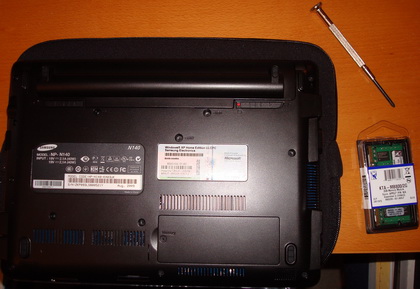
Remove the screw on the memory cover on the base of the N140. Then you’ll have to pull the cover off – I had to apply a bit of force to get it to open.
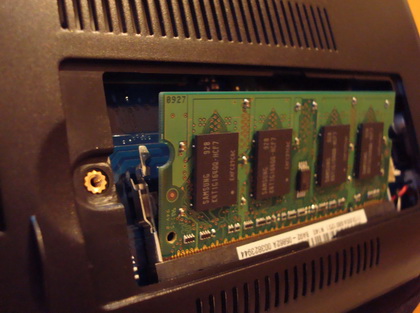
Pull the clips outwards and the old RAM should click up.
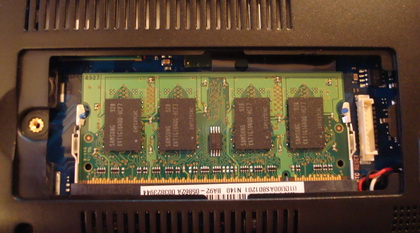
Remove the old RAM.
Carefully insert the new RAM into the socket and make sure it clicks back down into place.
Put the memory cover back on, re-insert the battery and turn on.
Hold your breath! Hopefully it works and you should see 2GB (or more probably 1.99GB) listed in the System Properties page. You can hold the Start key, Fn key and Pause/Brk to bring up the System Properties page. If it doesn’t then re-open the memory cover and make sure that the memory is correctly plugged in.
Keep the old memory safe – in case of emergency you can always plug the old memory back in.


I am planning on buying the saumsung n140 and upgrading the ram based on your instructions.
I have one question though, does this violate the 1year technical warantee.
If you don’t know I’ll ask at the shop when I buy it.
Thanks very much,
Upgrading RAM on n140,
I have purchased a n140 and also purchased the extra RAM, but made the mistake of buying 667Mhz. This does effect performance and on boot can be slower than the 1 GB. I have removed this and purchased the 800Mhz now. Idiot, I know. don’t make my expension mistake.
I purchased crucial RAM £40 delivered. Kingston also do a similar price RAM module, amazon is always competative. Worth just checking pricerunner.co.uk
I’m about to upgrade my RAM, thanks for taking the time to write the articule and take the pictures. Very useful.
Regards,
Is there any firmware update that would allow 4 gb of ram instead of just 2 gb, the way Apple did the mac mini?
800 mhz is much better.
a 40 gb SSD would also work well.
Hi Larry,
There is no way to add 4gb of RAM to the Samsung N140. 2GB memory is the maximum you can upgrade to.
I think you can add an SSD but this is not a supported upgrade. You would have to open the whole case up, which would void the warranty. And you’d be on your own in terms of getting it configured and working.
Hi, just took my N140 into a computer shop because it seems to run very slowly. They tried to expand the memory but they said would not work when they tried it. Any ideas
Thanks
Paddy
Hi Paddy,
What kind (and how much) RAM were they trying to put in?
I would have expected a computer shop to be able to do something as simple as installing some extra RAM, or at least give you a precise reason why they could not.
Hi, they were trying to put a 2gb ram in Kingston make. It was causing problems when they tried to start it up. I decided to leave it. However might take it elsewhere. Just seems to be running very slow. Checked it out all hardware is fine. Can you tell me if I increase the ram will it make much of a difference to the speed of the netbook. To be honest am disappointed at how slow it is.
Thanks
Paddy
Hi Paddy,
More RAM will make it run smoother – especially when multi-tasking. This is largely because more RAM will reduce the amount of swap file thrashing that goes on.
However it will not make it run fast. This is a netbook, it isn’t a full power laptop, so it is always going to be slow compared to a full speed computer. I have however found my N140 to be great for emailing, and some light web browsing on holiday. I’ve even managed to update my website occasionally using it.
So, Sammy N140 has just one RAM slot? I assume many netbooks, for reasons based on space, have just one RAM slot, which is a shame…
Having to buy a 2GB stick to upgrade the RAM, instead of just buying and adding a 1GB stick, which could be also performance-wise if they could work in dual channel mode… but it seems netbook manufacturers don’t think too much about consumers…
Great step-by-step – much appreciated for those of us who fear tinkering about with the ‘unknown behind the screwed panel’ lol!
Just a quick question to anyone really – assuming that the netbook will run smoother, allowing for increased multi-tasking – what is the detrimental effect to the battery life, if any?
Thanks in advance
Hi Sam, I haven’t noticed any decrease in battery life. But then I can’t claim to have scientifically measured it. On the one hand there is more memory for the N140 to power up, but on the other it will need to access the hard disk less. So I can’t imagine that it would make much difference overall.
just installed.
The screw on memory cover had been poorly installed but it did come out with patience.
bought it to run dragon naturally 11 -as it was crashing with 1gb memory
Hey there! I ordered the ram module from your link but it looks like they sent me this one instead:
http://www.amazon.co.uk/200-pin-SODIMM-PC2-6400-Memory-Module/dp/B001342KM8/ref=pd_cp_computers_2
I installed in into the n140 and just get a black screen and five beeps.
I put the orginal RAM back in and it works fine. Any ideas?! It it compatible? Or have they sent me something useless??
Cheers. Thanks for the page.
Hi Gilo, That memory you have linked to looks like the same type that I linked to. I’m no expert thought! I’d guess there are three main possibilities:
1. Either you didn’t install the RAM correctly into the Samsung N140 – you could try again and make sure it is fully pushed in.
2. The new RAM you have is damaged. In which case you’ll have to get a replacement.
3. It is the wrong type of RAM. You’d have to find someone who knows more about these things than me to verify this.
Just as a quick postscript to my problem. I contacted the supplier (Avides Media AG via Amazon.co.uk) and told them the module didn’t work. They refunded me immediately and told me there was no need to return the item (That’s German effeciency for you)!
So I then purchased a ‘Lexar Cucial’ module, it came next day, I installed it, and it worked (although no notable difference so far haha). Here is the link:
http://www.amazon.co.uk/gp/product/B0038FUAXG/
Cheers again!
Hi,
Since your conversations are a year old I have a repeat-question:
Is it now in sep 2011 possible to upgrade the N140 wth a 4gb RAM-memory?
Thanks
-micke-
Hi Micke – I think 2GB is a hardware limit, so I don’t think it will ever be possible to upgrade the original Samsung N140 to 4GB.
I just bought an NP-N145 JPO2 (probably N140 upgrade) Samsung netbook and want to upgrade from 1 to 2 gigs of memory but I just don’t which one to buy. I have a DDR3 but there are many kinds out there:
DDR3 PC3 12800 DDR3 1600
DDR3 PC3 10600 DDR3 1333
DDR3 PC3 8500 DDR3 1066
DDR3 PC3 14900 DDR3 14900
DDR3 PC3 16000 DDR3 2000
DDR3 PC3 17000 DDR3 2133
and what is the difference between 204 pins and 240 pins besides its size?
Thanks in advance,
Rick
go to crucial and scan you computer tells you what ram you have, what is the most ram lappy can take then copy and paste the ram details and do a google search. sometimes you can find it cheaper,as i very often do
I’ve had my Samsung N140 for nearly 2 years now. Very happy with it, but it is annoyingly slow at times (especially web browsing), so I’m thinking of upgrading the RAM now. Thanks for the guide – now I know that it can be uprgraded to at least 2GB.
I wonder if there is any way (some bios alterations or upgrades) that can allow 4GB upgrade?
Thanks.